
Skip to content
ForteveForteve
SessionBirdSessionBird

SessionBird · Omnichannel Communication Platform

Every Conversation. One Inbox.

WhatsApp, Instagram, Messenger, Telegram, TikTok, SMS, email and calls in one Message Center — with SERA AI helping you respond and grow.

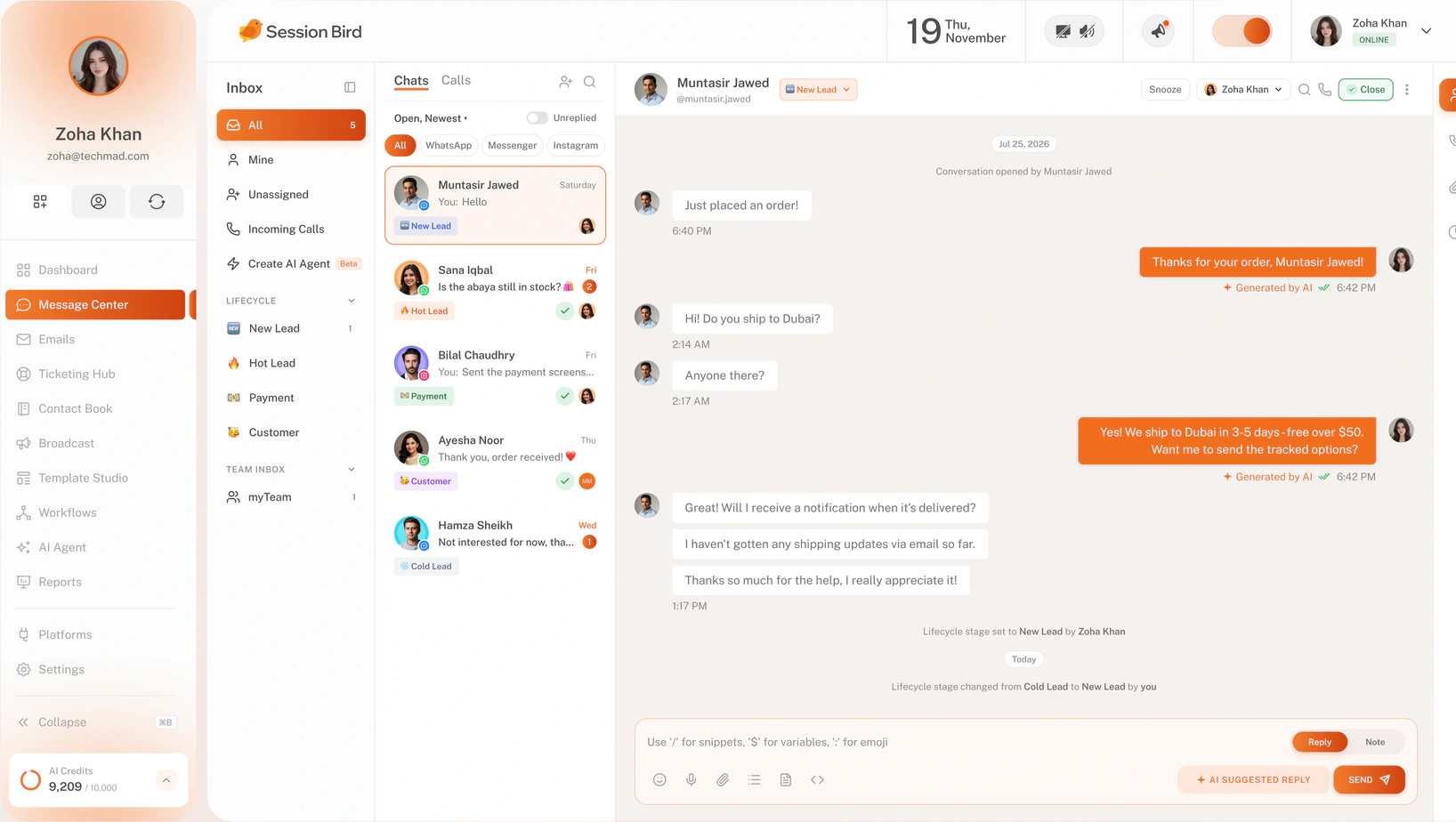
SessionBird’s Message Center: the team inbox with a WhatsApp chat from Muntasir Jawed, AI-generated replies and lifecycle updates.

At a Glance

  • 8 Channels

    One shared inbox

  • Auto Tickets

    From chatbot conversations

  • AI Summary

    Powered by SERA

  • Lifecycle

    New lead to customer

Connected Channels

  • WhatsApp
  • Instagram
  • Messenger
  • Telegram
  • TikTok
  • SMS
  • Email
  • Calls

How It Works

From First Message
to Final Follow-Up

Messages arrive from all eight channels. SERA and your team answer them in one place, and every next step is tracked.

SessionBird flow
  1. Channels — WhatsApp, Instagram, TikTok, Messenger, Telegram, SMS, email and calls — send conversations to the Message Center.
  2. The WhatsApp Chatbot sends complaints to the Message Center.
  3. SERA AI adds AI replies: an AI Summary and an AI Suggested Reply.
  4. Agents and admins reply and assign from the Message Center.
  5. The Message Center opens tickets automatically in the Ticketing Hub.
  6. It keeps every contact’s lifecycle stage in the Contact Book.
  7. It drives reminders: broadcasts and follow-ups such as payment reminders and abandoned carts.
  8. It sends metrics to Reports.
  1. Capture

    Chats, calls and chatbot complaints land in one Message Center.

    • ChannelsWhere customers message
    • WhatsApp ChatbotWelcome menu
    • Message CenterOne inbox for every chat and call
  2. Assist

    SERA drafts replies and summaries. Your team reviews, replies and assigns.

    • SERA AIForteve’s AI engine
    • Agents & AdminsYour team, in the loop
  3. Organize

    Complaints become tickets with SLAs, and every contact gets a lifecycle stage.

    • Ticketing HubFiled via chatbot
    • Contact BookLifecycle on every contact
  4. Follow Up

    Reminders go out to segments, and reports track every channel and ticket.

    • RemindersBroadcasts & follow-ups
    • ReportsDashboard & analytics

Use Cases

One Platform,
Every Way You Sell

See how teams and businesses use SessionBird, with SERA answering first, to turn conversations into revenue.

Turn Enquiries Into
Qualified Leads

For sales teams: answer every ad click and DM in seconds, qualify the buyer, and hand hot leads to a rep with the full chat.

  • 24/7AI replies on supported channels
  • 8Channels in one inbox
  • 1-clickHand-off to a rep
Guide · SalesQualify leads on WhatsApp, step by step(opens sessionbird.com in a new tab)
Today

Inside SessionBird

Reply, Resolve and Know Every Customer

A closer look at the Message Center, the Ticketing Hub and the Contact Book.

Message Center

Reply Faster, With
SERA at Your Side

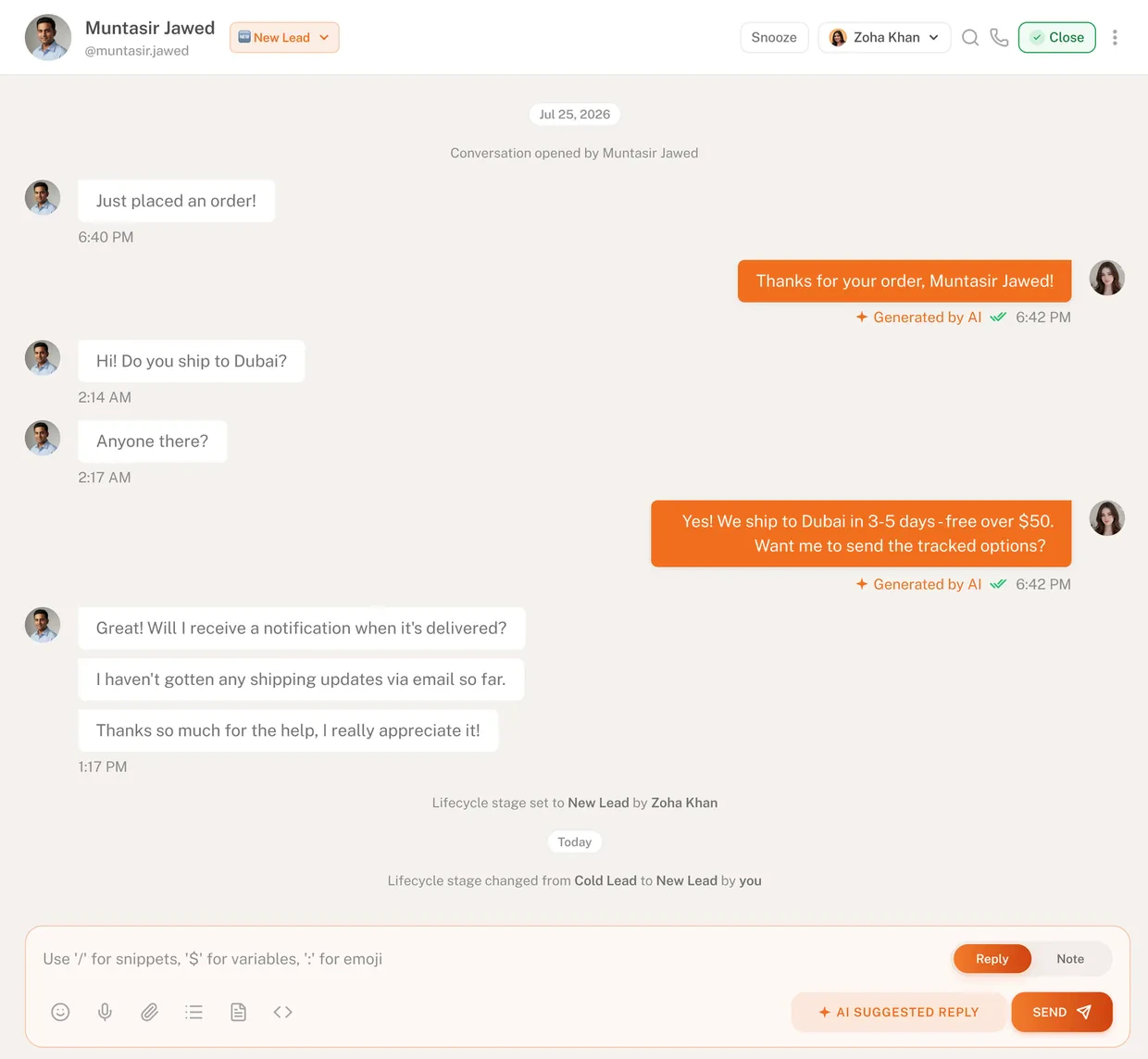
Every chat and call lands in one Message Center. SERA suggests the next reply, and your agents send it, edit it or add a private note.
  • AI Suggested Reply, right in the composer
  • Snippets with / and variables with $
  • Team inbox, assignment, snooze and close
A Message Center conversation: Muntasir Jawed asks about shipping to Dubai, the replies are marked “Generated by AI”, and the composer offers an AI Suggested Reply.

Ticketing Hub

From Chat to Ticket,
Automatically

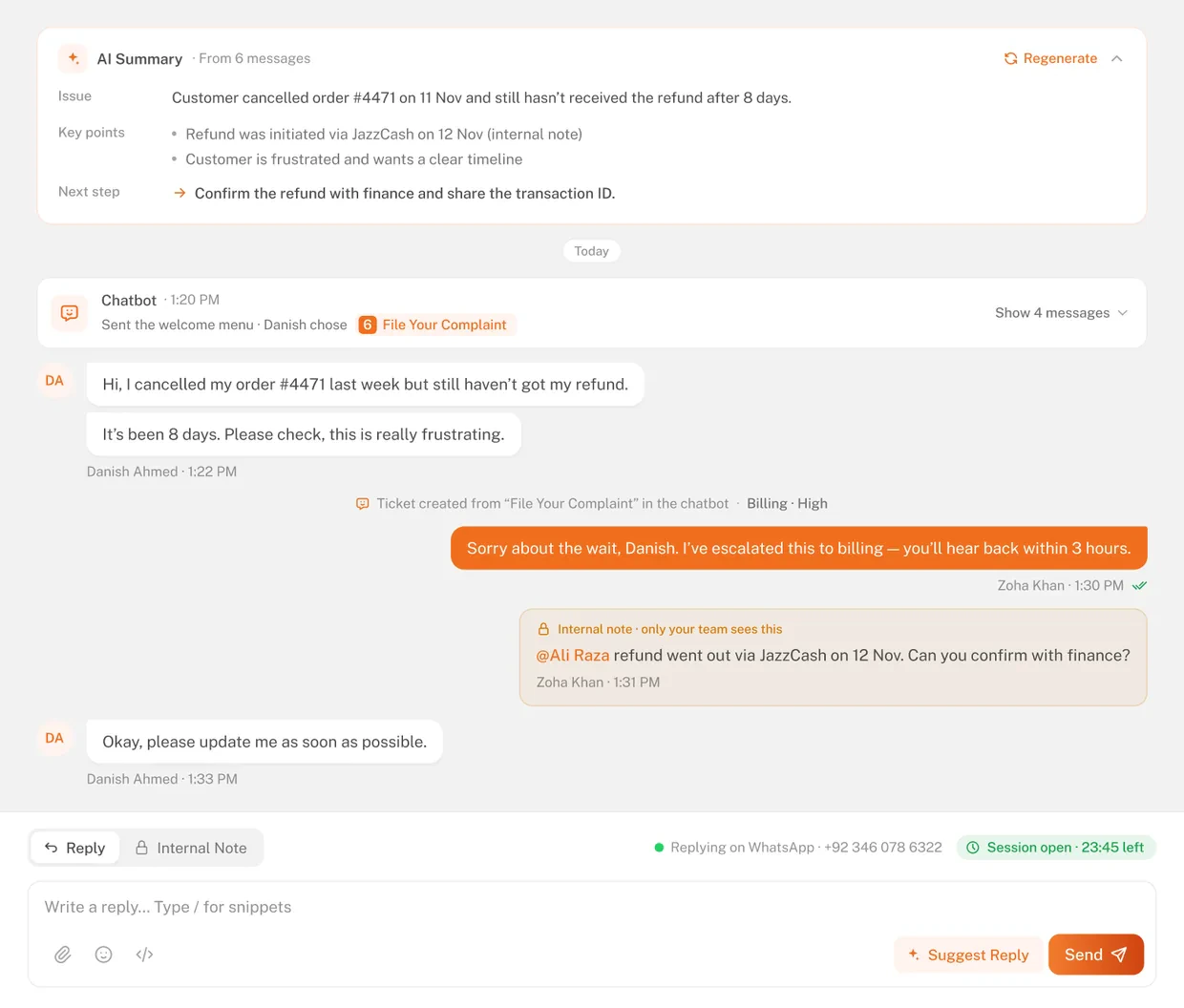
When a customer taps “File Your Complaint” in the WhatsApp chatbot, a ticket opens on its own. SERA sums it up, so your team knows what to do next.
  • AI Summary: issue, key points, next step
  • Priorities, departments and SLA timers
  • Internal notes with @mentions
A ticket created from the WhatsApp chatbot, with SERA’s AI Summary of the issue, key points and next step, the customer’s messages and an internal note.

SLA

Billing · High priority

First responseMet in 6m
Resolution dueIn 3h · 4:24 PM

Contact Book

Know Every Contact,
Across Every Channel

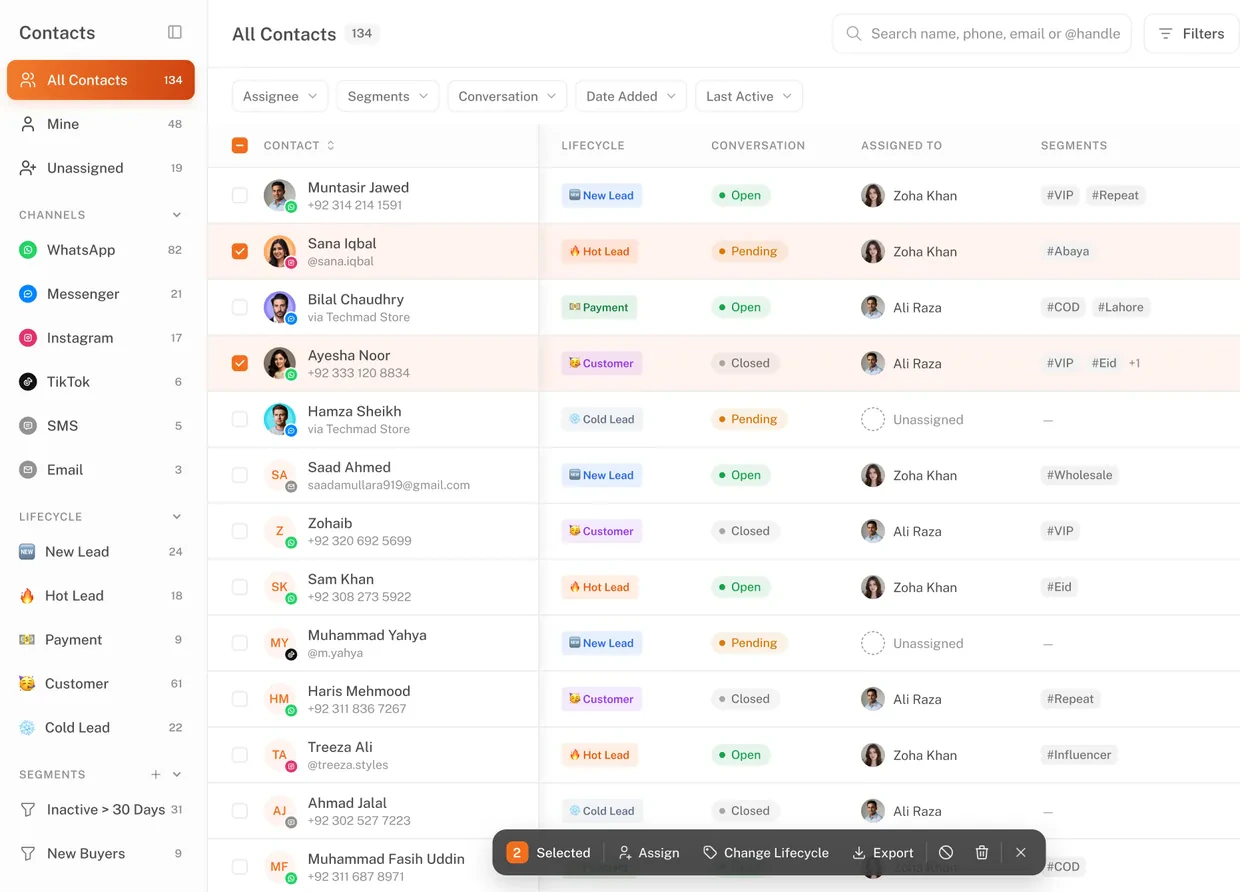
One record per customer, whatever channel they use. Move them from New Lead to Customer and organize them into segments.
  • Lifecycle stages from New Lead to Customer
  • Segments, tags and assignment
  • Import, export and bulk actions
The Contact Book: all contacts with their lifecycle stage, conversation status, assigned agent and segments, filtered by channel and lifecycle.

Beyond the Inbox

Sell, Automate and Grow
on Every Channel

Broadcasts, templates, workflows, lifecycle stages and robo calls, working across every channel from one place.

  • 01 · Broadcast

    Broadcast on
    Every Channel

    Send one campaign to WhatsApp, SMS, email and Instagram. Personalise it with Contact Book data, without the spam feel.


  • 02 · Team Inbox

    One Inbox for
    Every Team

    Route chats, emails and calls to Sales, Support or Marketing. Many agents on one number, every assignment tracked.

  • 03 · Template Studio

    Templates That
    Get Replies

    Design templates with media, buttons and quick replies in Template Studio. Approved once, reused on every channel.

  • 04 · Workflows

    Workflows That
    Run on Their Own

    Set a trigger, add conditions, pick the action. Chats get assigned, tagged and followed up around the clock.

  • 05 · Lifecycle Stages

    Lifecycle Stages,
    Lead to Loyal

    Move every contact from new lead to customer. Stages update from the conversation, so your pipeline stays current.

  • 06 · Robo Calls

    Robo Calls That
    Get Answers

    Automated voice calls in Urdu and English confirm COD orders, remind patients and chase payments. Every keypress lands in the inbox.

Capabilities

Everything Your Team
Needs, in One Place

With 200+ features, SessionBird brings communication, automation, analytics, and workflows together in one connected platform.
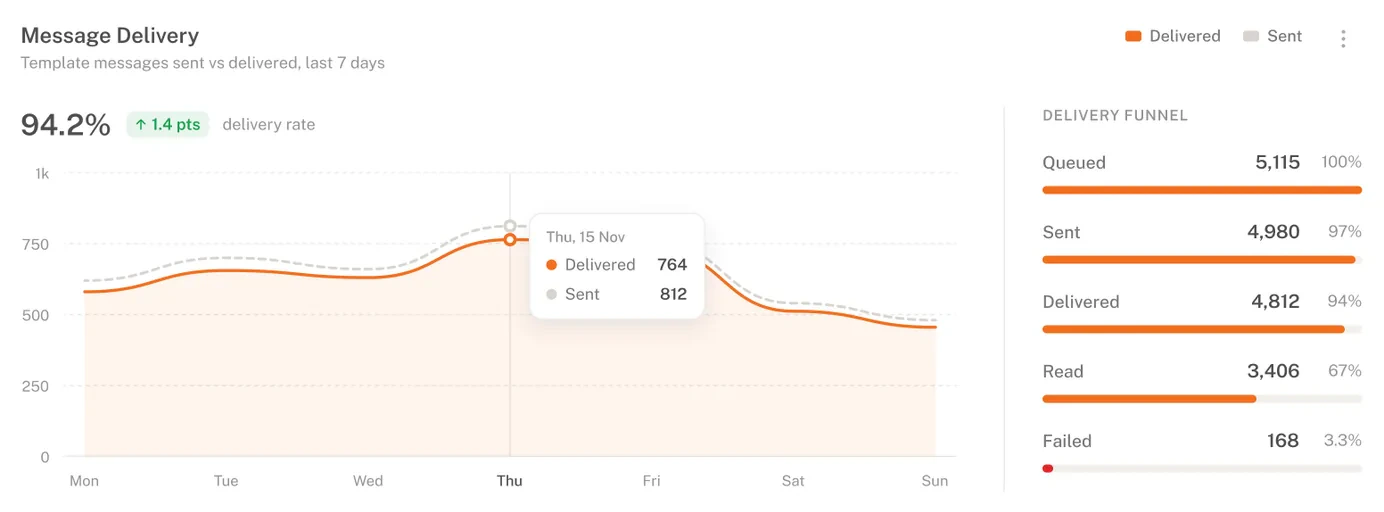
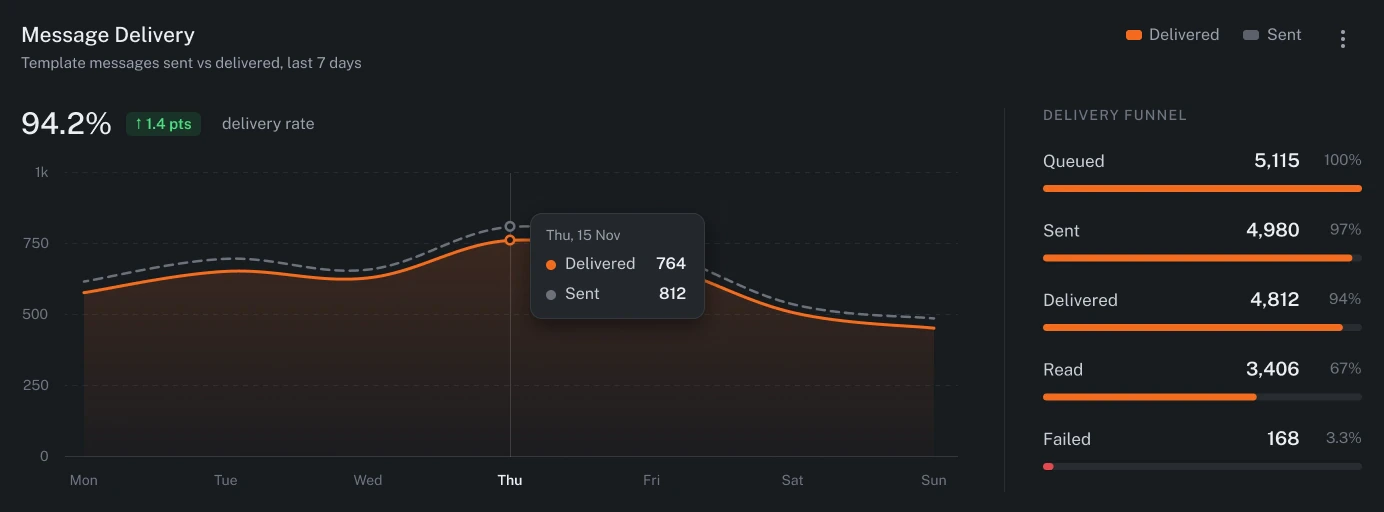
  • The Message Delivery dashboard: templates sent vs delivered over the last 7 days, a 94.2% delivery rate and the delivery funnel from queued to read.The Message Delivery dashboard: templates sent vs delivered over the last 7 days, a 94.2% delivery rate and the delivery funnel from queued to read.

    Dashboard

    Follow every template message from queued to read, next to active users, handling time and satisfaction.
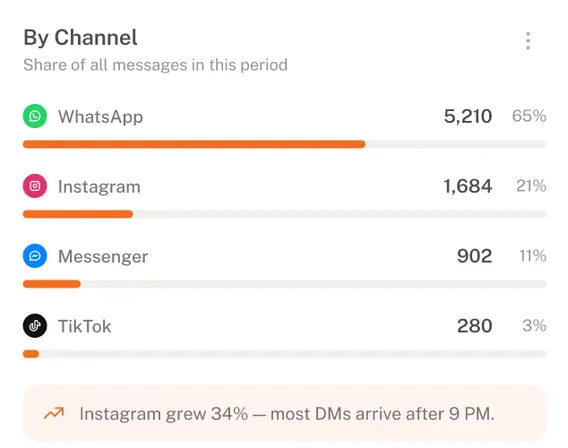
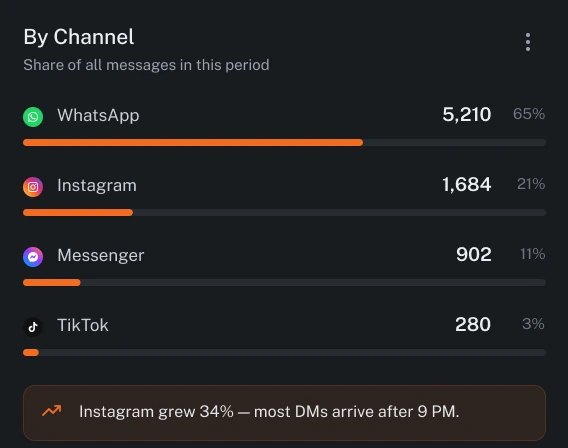
  • The By Channel report: share of messages from WhatsApp, Instagram, Messenger and TikTok, with a note that Instagram grew 34%.The By Channel report: share of messages from WhatsApp, Instagram, Messenger and TikTok, with a note that Instagram grew 34%.

    Reports

    See which channels bring conversations, when they peak and how fast tickets close.
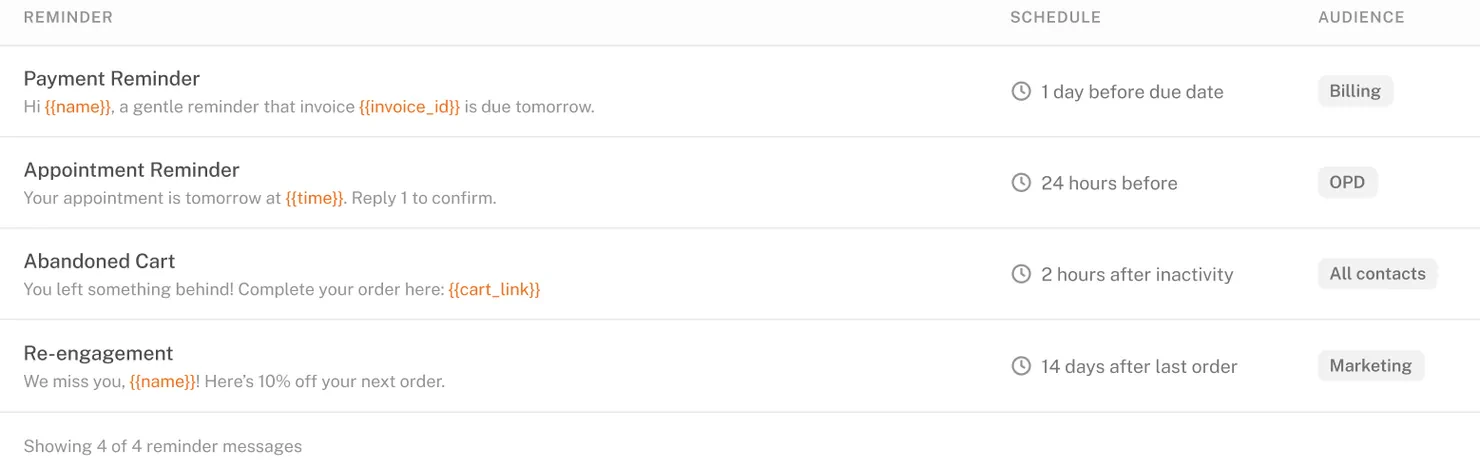
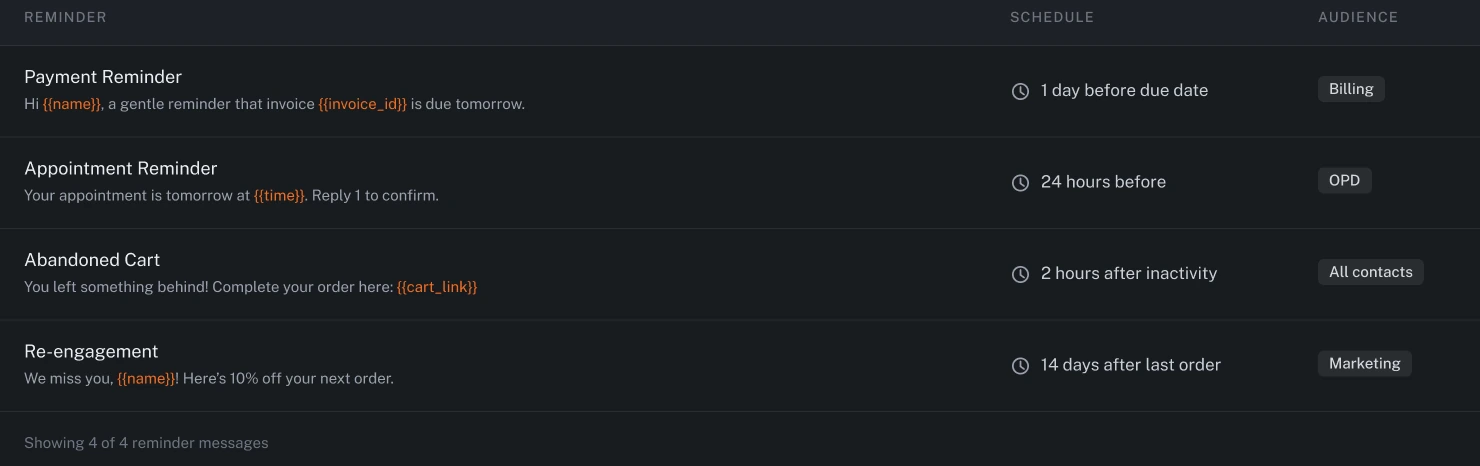
  • Reminder messages with their schedules and audiences: Payment Reminder, Appointment Reminder, Abandoned Cart and Re-engagement.Reminder messages with their schedules and audiences: Payment Reminder, Appointment Reminder, Abandoned Cart and Re-engagement.

    Reminder Messages

    Automatic follow-ups for payments, appointments, abandoned carts and re-engagement, each sent to the right segment.

  • Broadcasts

    Send approved template messages to a segment and track every delivery.

  • Canned Messages

    Saved replies any agent can drop into a chat by typing / and a shortcut.

  • AI Agent

    Build an AI agent on SERA to take on conversations. Now in beta.

  • Team Inbox

    All, Mine and Unassigned views, with assignment, snooze and close.

  • Segments & Tags

    Group contacts to filter the inbox and target broadcasts.

  • Internal Notes

    Team-only notes on any chat or ticket, with @mentions.

  • Calls in the Inbox

    Incoming calls sit next to chats, with a calls report of their own.

  • Roles & Seats

    Admin and agent roles, with seats managed on your plan.

Integrations

Connect Your Tools,
Let AI Take It From There

Pull customer data from Shopify, HubSpot and Google Sheets so SessionBird’s AI always has the context to engage, sell and support. Sync updates and trigger actions across your tools, no more data silos.

SessionBird
  • WhatsApp
  • Instagram
  • Messenger
  • Facebook
  • TikTok
  • Telegram
  • Viber
  • LINE
  • WeChat
  • SMS
  • Gmail
  • Shopify
  • HubSpot
  • Salesforce
  • Google Sheets
  • Google Calendar
  • Zapier
  • Make
  • Meta
  • Webhooks

Who It’s For

Built for Teams That
Talk to Customers

From online stores to clinics, SessionBird fits wherever conversations drive the work.

  • E-commerce & D2C Brands

    Sell over WhatsApp and Instagram DMs, move leads to paying customers, and follow up on carts and payments.

    • Instagram
    • Lifecycle
    • Broadcasts
  • Support Teams

    Handle complaints, refunds and delivery issues as tickets, with priorities, departments and SLAs.

    • Tickets
    • SLA
    • AI Summary
  • Clinics & Public Services

    Send appointment reminders, sort contacts into segments, and route complaints to the right department.

    • Reminders
    • Segments
    • Departments

Built by Forteve

Designed, Built and
Run by Forteve

SessionBird is our own product. Forteve shaped the strategy, designed the experience, engineered the platform and built the channel integrations, with SERA, our AI engine, inside.

Forteve’s Role
  • Product Strategy
  • UI/UX Design
  • Engineering
  • SERA AI
  • Integrations

Let’s Build Together

Have an Idea? Let’s Give It Wings.

Tell us what you’re building. We’ll bring the team, the process, and the engineering.

Start a Project